Greco-American distro upholds high standards while breaking new ground

By Larry Cafiero
When we last left MX Linux – and this was back in October when I was writing Distro of the Week for FOSS Force – I recall being very impressed with the distro at the time, specifically MX Linux 23.6 Libretto.
But first, let’s recap, shall we?
Officially, according to the MX Linux website, “MX Linux is a cooperative venture between the antiX and MX Linux communities. It is a family of operating systems that are designed to combine elegant and efficient desktops with high stability and solid performance.”
The project started as a collaborative effort between the antiX and former MEPIS communities, with the name being derived from the “M” in MEPIS and the “X” in antiX, as an acknowledgment of its roots.
MX Linux 23.6 Libretto featured a wide variety of benefits that set it apart from its antiX counterpart, and was a perfect complement for newer hardware.
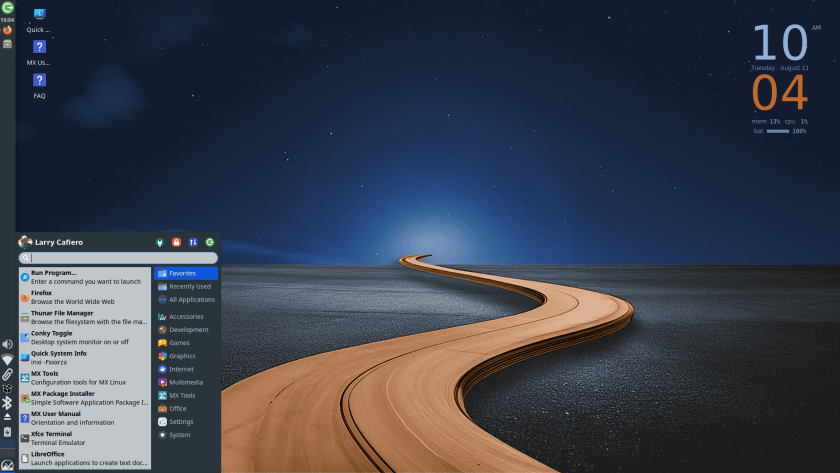
But the MX Linux developers apparently ramped up their game for their latest offering. MX Linux 25.2 Infinity represents a significant upgrade over Libretto, focusing on modern usability, improved installation processes, and enhanced compatibility with current software standards.
MX Linux 25.2 Infinity provides an improved compatibiity with modern software packaging, as opposed to the last release’s limitation to older Debian packaging. The toolset in the newer distro is enhanced and migrated to Qt6. And the System Initialization goes for the former’s SysVinit to the latest version’s using systemd by default.
Installing MX Linux 25.2 Infinity
The MX Linux 25.2 Infinity ISO is an economical 2.9 GB, which downloaded swiftly and we put it on a USB drive fairly quickly as well.
While booting into the live USB, the user still gets a choice to log into SysVinit or systemd at the start, we went with systemd to be modern. The Xfce 4.20 desktop comes up in a minute – probably less – with a side panel on the left and a basic Conky in the upper right hand corner.
The MX Linux installer was next on the agenda. It goes through the process of checking the media first, which takes a bit of time, and then takes you to a Terms of Use page with keyboard settings. Once that’s settled, you select your type of installation – we chose Regular install using the entire disk – and here’s where the installer gets interesting.
While the distro is installing, you have to set up the rest of the system, which is easily done with the Next button in the lower right. It asks for network names, time zone preference, login name and password – where it also gives you an option for a root password, which we took – before waiting for the install to finish.
To be fair, it’s a unique and efficient way to set up the install; instead of waiting for the install after putting in all your information, the install is underway while you’re filling in the blanks for your new system. And when we were finally finished, 97 percent of the download was complete. A short while later, the installation was complete and we were ready to boot into our new system.
Kicking the tires
Before we start, it would be good to mention that MX Linux 25.2 Infinity comes in three basic flavors: Xfce 4.20 desktop environment, KDE Plasma desktop environment, and the Fluxbox window manager. For purposes of this review, we stuck with the familiar Xfce desktop environment.
The reboot offers an MX Welcome window outlining various points of interest for the distro, including links to the Users Manual, the MX Linux wiki, a FAQ, and a tour for new users.

After a standard system update just to make sure we’re up to date, it’s time to see what we have in store for this new distro. For a 2.9 GB ISO, the included software in the original download is first-class: Firefox web browser, Thunderbird email client, VLC media player, the LibreOffice suite of software, as well as a plethora of MX Linux tools which would make the most grizzled greybeard laugh with glee.
Interestingly, MX Linux 25.2 Infinity doubles down on some of the software available. The most noteable example is that not only does the distro include VLC, but also Strawberry as well. It is this kind of attention to detail that could easily spoil any user.
But I digress.
The included-by-default MX Linux tools were quite helpful. For example, the Conky System Monitor provides a wide range of pre-set Conky options available, with a range of choices that borders on being daunting. I finally ended up with the antiX version because… well, old habits die hard. Nitrogen, the wallpaper manager, provided a wide range of desktop illustrations and photos to choose from, and choosing one was difficult — to the point that I just stuck with the original.
Once I had everything set up to my liking and could get down to business, I found MX Linux’s ease of use remarkable. Multitasking was a breeze, and the distro hardly broke a sweat no matter how many programs I had running simultaneously.
The final word
While back in October I didn’t think that MX Linux could be improved upon, their developers proved me wrong. The improvements included in the latest distro easily puts it head and shoulders above the previous version in many ways.
MX Linux 25.2 Infinity is an ideal candidate for new users as well as grizzled veterans. MX Tools are simple to master for the beginner, while the greybeards will welcome their inclusion in the distro. It bears mentioning that, especially for new users, the documentation available in the wiki, the forum, and various linked videos are more than adequate, should you run into an issue.

As I said in October, MX Linux seems to have found the sweet spot in Linux distro development: It’s small enough to be specialized but large enough to be used by many people worldwide. This combination sets them apart by virtue of the fact users will ultimately realize that a lot of thought went into the distro’s production. Combined with its support for both older and bleeding edge hardware, the result is a distro designed to put a wide range of users on equal footing.
MX Linux 25.2 Infinity is definitely and unequivocally worth a look. Visit the download page and try it out for yourself.
Do you have a distro you think would make a great feature for Distro of the Week? Don’t be shy—let me know! Email me at larry.cafiero@gmail.com and I’ll make an effort to make your choice available to the wider public … No suggestion is too mainstream!